Blog
LinkedIn Tips
5 Best LinkedIn Inbox Management Tools
This guide breaks down the best LinkedIn inbox management tools to help you stay organized, respond faster, and turn conversations into real results.

Todd Kunsman
Founder and Experienced SaaS Marketer

tl;dr
Most LinkedIn users outgrow the native inbox once message volume increases and you’re using the platform for marketing and sales.
The right tool can help you organize conversations, track follow-ups, and reduce missed opportunities.
Linkeezy and Kondo stand out as great options to focus and move fast through your messy LinkedIn inbox.
If you use LinkedIn daily for sales, recruiting, or networking, then you know your inbox can quickly become overwhelming.
And more than ever with AI and automation tools, clogging up your inbox. So now you have messages pile up, important follow-ups getting missed, and opportunities that matter are completely slipping through the cracks.
This guide breaks down the best LinkedIn inbox management tools to help you stay organized, respond faster, and turn conversations into real results.
Best LinkedIn Inbox Tools
Tool | Best For | Key Features | Ease of Use | Pricing |
|---|---|---|---|---|
Linkeezy | LinkedIn inbox and content workflows | Labels, reminders, notes, filters, draft mode, and more. | High | $12 to $30 per month pending plan |
Kondo | Deeper LinkedIn inbox and integrations | Split inboxes, keyword shortcuts, integrations | High | $28 to $65 per month pending plan |
LeadDelta | LinkedIn CRM and data management | Kanban inbox, bulk actions | Medium | $17.50 to $99 per month pending plan |
Waalaxy | LinkedIn outreach and automation | Sequences, templates, inbox features | Medium | $16 to $69 per month pending plan |
Kanbox | CRM-style pipeline management and LinkedIn outreach | Pipeline, reminders, inbox integration | Medium | $10 to $80 per month pending plan |
Take Control of Your Inbox
Before we get into the tools, it is worth asking one question.
How many opportunities are you missing right now because your inbox is disorganized?
You honestly may not even realize how bad it is until you have a better way to focus how your inbox looks.
If you are relying on memory or scrolling to manage conversations, you are already losing time, opportunities, and potential deals or candidates.
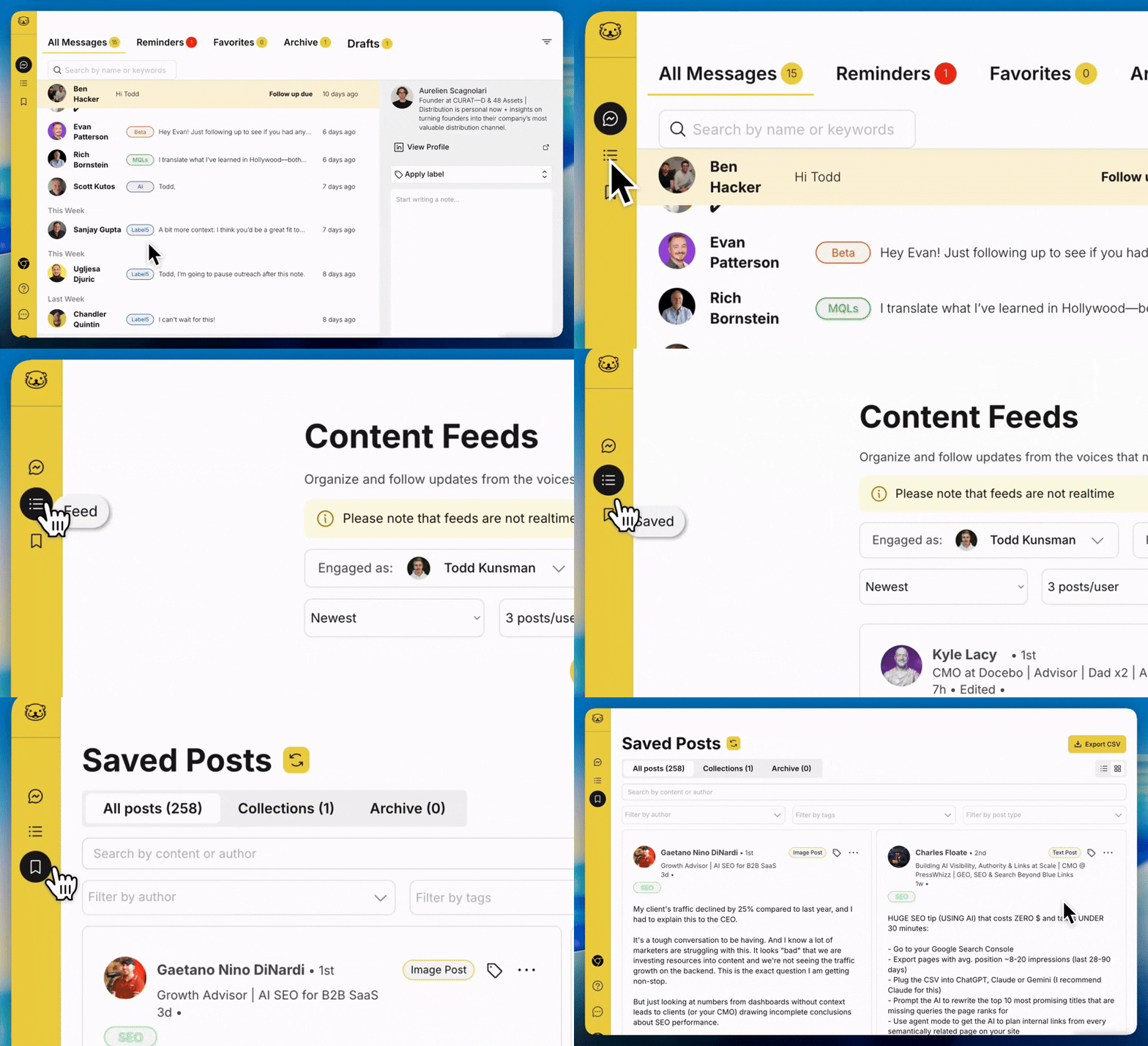
Linkeezy helps you move through your LinkedIn inbox faster with labels, reminders, filters, draft mode, and more.
👉 Try Linkeezy to organize your inbox and stay on top of every conversation. Sign up for a 7-day free trial, no credit card required.
The Problem With LinkedIn’s Native Inbox
LinkedIn’s inbox works fine when you only get a few messages a day. But once you start using the platform seriously, it breaks down fast.
No labels or filters to organize conversations
No reminders or easy follow-up tracking
Hard to find important messages when message volume increases
No way to add notes or context of the people you’re DMing
This leads to missed replies, forgotten leads, and unnecessary stress. And add in all the AI slop DMs, you're losing the stuff that matters.
That is why many professionals turn to dedicated inbox tools for LinkedIn.
What to Look for in a LinkedIn Inbox Tool
Not all tools are built the same.
Some focus only on cleaning up your inbox, some act more like a full workflow system, and others it’s a simple bolt on to their all-in-one solution.
What you choose depends on your needs. But here are the key features to look for:
Organization: You should be able to label, filter, and segment conversations so you can quickly find what matters.
Follow-Ups: Snooze and reminders are critical. Without them, even the best conversations can go cold.
Speed: How can you move faster and efficiently? Auto filters, keyboard shortcuts, focused views, and a clean interface make a big difference when you are handling volume.
Context: Notes and conversation history help you remember who someone is and what you discussed. But ultimately keep your messaging tight when you know who it is and can access their profile activity better.
Automation: Some tools include templates or sequences, which can save time if you do outreach. But be cautious of those automating messages or outreach, which can put your account at risk. Only trust those working hard to establish limits, but even then it may not be worth it to you.
Compliance: LinkedIn takes their Terms of Service very seriously. You want to only utilize tools that do not automate messages, scrape restricted data, or interject code onto the platform to alter the look. Third-party tools are okay as long as they abide by the rules.
Note: You can certainly get away with using automation, if you keep it at human speed and interactions. However, we’d recommend not risking that if LinkedIn is critical to your business or work. But we understand why these tools can be impactful, so use those at your own risk!
5 Best LinkedIn Inbox Management Tools
Let’s break down each option so you can decide what fits your LinkedIn workflow best.
1. Linkeezy (Best for Inbox + Content Workflow)
Linkeezy is more than just an inbox tool. It is designed to improve how you use your time on LinkedIn overall.
Instead of simply cleaning up your messages, it turns your inbox into a structured workflow..
What it does well
Linkeezy gives you a Gmail-like experience with your LinkedIn inbox. You can label conversations, filter messages, use draft mode, snooze messages and get automatic reminders, and split your inbox into different views.
You can also:
Add notes to conversations
Set follow-up reminders
Create signatures and formatting to messages
Create filters to automatically organize messages
This is where it really stands out.
Most tools only focus on messages. While the inbox is a critical feature, Linkeezy connects your inbox with the rest of your LinkedIn workflow.
It has a function for curating feeds of people and topics, great for prospecting lists or industry insights. And a saved posts feature, that allows you to organize, label, and search all your favorite content of playbooks and insights.
Why it is different
If you spend hours on LinkedIn each week, you need more than a basic inbox cleanup tool. You need a system.
Linkeezy helps you manage conversations, content, and your feed in one place. That makes it especially useful for founders, creators, marketers, and sales professionals.
Best for
People who live on LinkedIn daily or weekly (founders, sellers, recruiters, etc.)
Anyone managing a high volume of conversations
Users who want both inbox and content organization
Bottom line
If you want a complete LinkedIn productivity system, Linkeezy is one of the strongest options available for the inbox and more. Sign up for a free trial here.
2. Kondo (Best interface + Deeper Inbox Needs)
Kondo focuses on doing one thing well. And I mean very well. It cleans up your LinkedIn inbox without adding complexity.
What it does well
Kondo offers a clean interface that makes it easier to navigate your LinkedIn messages. It removes clutter and helps you focus on conversations.
Key features include:
Simple inbox organization
Clean and minimal design
Fast performance
Where it falls short
Kondo does not go beyond the inbox. There are no advanced workflow features like draft mode or deeper content organization systems.
Best for
Solo users, sellers
People who want a quick and strong inbox-only solution
Anyone who feels overwhelmed by complex tools
Anyone needing deeper integrations to CRMs
Bottom line
If you just want a cleaner inbox and nothing more, Kondo is a solid choice.
3. LeadDelta (Best for Visual Inbox Management)
LeadDelta takes a different approach by turning your inbox into a visual system.
What it does well
Instead of a traditional message list, LeadDelta uses a Kanban-style layout. This allows you to move conversations through different stages.
Features include:
Visual pipeline for conversations
Bulk message management
Relationship tracking
Where it stands out
If you think in terms of pipelines or stages, this approach can make a lot of sense. It is especially helpful for managing leads or ongoing conversations.
Where it falls short
It can feel heavier than other tools, especially if you just want a simple inbox upgrade.
Best for
Sales professionals
Recruiters
Anyone managing many active conversations
Bottom line
LeadDelta is a strong option if you prefer a visual, pipeline-driven workflow. Or looking for more data insights.
4. Waalaxy (Best for Outreach + Automation)
Waalaxy combines LinkedIn automation with inbox management.
What it does well
This tool is built for outreach. It helps you send connection requests, follow-up messages, and manage campaigns.
Key features include:
Message sequences and templates
Campaign automation
Inbox management features
Where it stands out
If your main goal is lead generation, Waalaxy gives you the tools to scale your outreach.
Where it falls short
The inbox is not the main focus. It is more of a supporting feature within a larger automation platform. also, automation on LinkedIn is a grey area.
Best for
Outbound sales
Lead generation campaigns
Users who want automation
Bottom line
Waalaxy is best if you want automation first and inbox management second.
5. Kanbox (Best for Pipeline + Inbox Combo)
Kanbox blends CRM functionality with LinkedIn inbox management.
What it does well
It gives you a structured way to track conversations and move them through a pipeline.
Features include:
Smart inbox with filters
Kanban-style pipeline
Follow-up reminders
Templates for messaging
Where it stands out
Kanbox feels closer to a CRM than a general inbox tool. This makes it useful for teams and structured workflows.
Where it falls short
It can take time to set up and learn. It is not the most lightweight option.
Best for
Sales teams
Users managing structured pipelines
Anyone who wants deeper tracking
Bottom line
If you want a CRM-style system tied to your LinkedIn inbox, Kanbox is worth considering.
Which Tool Should You Choose?
The best tool depends on how you use LinkedIn.
If you want something intuitive with deeper inbox only features, Kondo is a good choice.
If you prefer a visual system, LeadDelta or Kanbox may fit better.
If your focus is outreach and automation, Waalaxy can help.
But if you want a complete system that improves how you manage conversations, content, and your overall workflow without a high price tag, Linkeezy is the most well-rounded option.
Ready to improve your LinkedIn inbox?
If LinkedIn is a core part of your business, your inbox should support you, not slow you down.
Linkeezy helps you organize conversations, prioritize what matters, and never miss an opportunity again.
👉 Try Linkeezy free and turn your LinkedIn inbox into a focused system.
Todd Kunsman
Founder and Experienced SaaS Marketer
Share